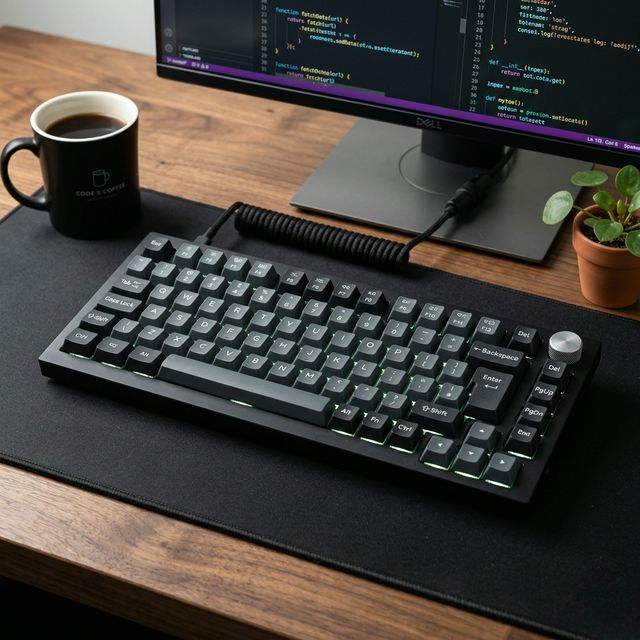
Most keyboard guides talk about sound profiles, RGB animations, and which switches feel the “thockiest.” That’s fine for enthusiasts. But if you’re a developer who types 8–10 hours a day, across multiple machines, with deadlines bearing down — your needs are more specific than that.
You need a keyboard that helps you work. Precisely.
This guide skips the fluff and focuses on the 5 best mechanical keyboards for programmers in 2026 — evaluated on what actually matters for daily coding: typing comfort, programmability, multi-device support, layout efficiency, and noise level for office environments.
What Programmers Actually Need in a Keyboard
Before the picks, here’s the honest checklist:
| Feature | Why It Matters for Coders |
|---|---|
| Layout | 75% or TKL keeps arrow keys without sacrificing desk space |
| Switch feel | Tactile switches reduce mistyping; linears reduce fatigue on long sessions |
| Hot-swap | Swap switches without soldering — test without commitment |
| Programmability | QMK/VIA lets you remap keys at firmware level (works in every OS) |
| Multi-device | Switch between work laptop, personal PC, tablet without replug |
| Noise level | Silent or tactile switches for open offices and calls |
Quick Comparison
| Keyboard | Price | Layout | Programmability | Wireless | Best For |
|---|---|---|---|---|---|
| Keychron Q1 Max | ~$199 | 75% | QMK/VIA ✅ | ✅ 2.4GHz + BT | Power users & heavy customizers |
| Logitech MX Keys S | ~$110 | Full | Logi Options+ | ✅ BT + BOLT | Multi-device productivity |
| NuPhy Air75 V2 | ~$149 | 75% | NuPhy Console | ✅ 2.4GHz + BT | Portability + Mac users |
| Ducky One 3 Mini | ~$109 | 60% | Limited | ❌ Wired | Minimalists on one machine |
| ZSA Moonlander | ~$365 | Split ergo | QMK/Oryx ✅ | ❌ Wired | Ergonomics & RSI prevention |
1. Keychron Q1 Max — Best Overall for Power Users
Price: ~$199 | Layout: 75% | Switches: Keychron Pro (Gateron-based, hot-swap)
The Q1 Max is the keyboard recommendation I give most consistently to developers who are serious about their tools. It’s the rare board that genuinely satisfies both sides of the brain: the practical engineer who needs a reliable, multi-device wireless keyboard, and the hobbyist who wants QMK firmware control and a great modding foundation.
Why programmers love it:
- Full QMK/VIA support — remap any key, create layers, build complex macros that follow you at the firmware level across every OS and app
- 75% layout keeps F-row (essential for IDE shortcuts like F5, F12 Refactor, Shift+F10) and arrow keys intact
- Triple wireless: 2.4GHz (low latency), Bluetooth (up to 3 devices), and wired USB-C
- The aluminum gasket mount gives a quiet, premium typing feel with much less finger fatigue than stiff tray-mount boards
Best switch for coders: Keychron Pro Brown (tactile, quiet) or Pro Red (linear, silent) depending on your office environment.
Verdict: ⭐⭐⭐⭐⭐ — The coding keyboard I’d buy without hesitation at this price.
2. Logitech MX Keys S — Best for the Multi-Machine Developer
Price: ~$110 | Layout: Full-size | Switches: Scissor (not mechanical — but hear us out)
Yes, the MX Keys S uses scissor switches, not mechanical ones. We’ve covered it in depth in our full review. But it earns its place on this list because no keyboard on earth does multi-device switching better — and for developers who bounce between a work MacBook, a personal Windows build, and an iPad, that matters more than switch feel.
Why programmers love it:
- Easy Switch between 3 devices — press one button, switch instantly. The muscle memory from this alone saves minutes every day
- Near-silent typing that won’t attract glares on company calls
- Per-key backlighting with proximity sensor — the keys light up when your hands approach
- Compatible with both macOS and Windows layouts simultaneously via Logi Options+
The honest caveat: If you only work on one machine and you want deep programmability, the Q1 Max wins. The MX Keys S is the productivity keyboard for the multi-device developer, not the custom keyboard enthusiast.
Verdict: ⭐⭐⭐⭐½ — Unbeatable for developers splitting time across 2–3 machines.
3. NuPhy Air75 V2 — Best for Mac Users & Frequent Travelers
Price: ~$149 | Layout: 75% | Switches: NuPhy Aurora (hot-swap)
The Air75 V2 is built for developers who carry their setup with them. It’s under 750g, gasket-mounted, triple-connectivity — and it has the best macOS integration of any non-Apple keyboard we’ve used. The physical OS toggle on the back flips between Mac and Windows key layouts, which sounds trivial until you’ve dealt with Command/Control remapping nightmares.
Why programmers love it:
- Lightest quality 75% keyboard in this guide — genuinely portable
- NuPhy Console handles lighting, remapping, and macro assignment without needing to be online
- 200+ hour battery life (no backlight) means you don’t stress about charging on travel days
- Silent tactile switch option (Aurora Daydream) is one of the quietest tactile switches available at stock
Verdict: ⭐⭐⭐⭐½ — The best laptop-companion keyboard for Mac developers.
4. Ducky One 3 Mini — Best for Minimalists on a Single Desk
Price: ~$109 | Layout: 60% | Switches: Cherry MX or Gateron (hot-swap editions)
If you work at one desk, don’t need wireless, and want to free up every square inch of mousing space — the Ducky One 3 Mini is the answer. The 60% layout removes the function row, arrow keys, and navigation cluster in favor of maximum compactness, then puts them back on a function layer.
Why programmers love it:
- Premium build quality at $109 — Ducky has been making keyboards for 15+ years and it shows
- Cherry MX switch options (Blue, Brown, Red, Silent Red) — the gold standard for reliability
- The compact footprint genuinely improves posture and mousing comfort over time
- Enormous keycap compatibility — find any set you want, it’ll fit
The honest caveat: 60% takes real adaptation time. The first two weeks of reaching for arrow keys that aren’t there is a rite of passage. If you’re constantly switching between this and a laptop keyboard, the layout collision is frustrating. Best for developers with one fixed workstation.
Verdict: ⭐⭐⭐⭐ — Best pure 60% option for the committed minimalist.
5. ZSA Moonlander — Best for Ergonomics & Long-Term Health
Price: ~$365 | Layout: Split ergonomic | Switches: Kailh or Gateron (hot-swap)
The Moonlander is not a “first keyboard.” It’s what you buy after two years of daily coding when you start feeling the wrist. It’s a fully split, ortholinear, tilt-adjustable keyboard that forces your hands into a more natural, shoulder-width position and eliminates the ulnar deviation that causes RSI over years of typing.
Why programmers love it:
- Full QMK + Oryx configurator — the most powerful customization ecosystem in any consumer keyboard
- Split design eliminates the constant inward turn of wrists on traditional boards
- The learning curve (2–6 weeks minimum) is worth it for anyone logging 8+ hours of typing daily
- Supports thumb clusters — move common keys (Enter, Backspace, Ctrl) to your thumbs to reduce pinky strain
The honest caveat: $365 is a serious investment. The learning curve is real — your typing speed will drop noticeably for weeks before recovering. And it’s wired-only, which is a limiting factor for multi-machine setups. But for RSI prevention and true ergonomic optimization, nothing on this list comes close.
Verdict: ⭐⭐⭐⭐½ — The keyboard that could save your career longevity.
Which Should You Buy?
| Your Situation | Pick |
|---|---|
| Full-time dev, heavy customizer, multi-device | Keychron Q1 Max |
| Work Mac + Personal PC + iPad daily | Logitech MX Keys S |
| Mac user, work from cafes and coworking | NuPhy Air75 V2 |
| One desk, minimalist, RS I-free | Ducky One 3 Mini |
| Wrists hurting, 8+ hrs daily typing | ZSA Moonlander |
The Switch Recommendation for Coders
If you’re unsure which switches to order, here’s the shorthand:
- Silent office, open plan: Gateron Silent Red (linear) or Boba U4 (silent tactile)
- Home office, want feedback: Gateron Brown or Akko V3 Cream Blue (tactile)
- Work late at night: Any silent linear — speed without sound
- Single machine power typist: Gateron Yellow or Oil King (smooth linear)
Final Thoughts
The best keyboard for a programmer isn’t the loudest, the most RGB-lit, or the most aesthetically praised on Reddit. It’s the one that disappears — where you’re never thinking about the keyboard, only about the problem you’re solving.
Every board on this list, in its intended use case, can get you there.
Disclosure: Links in this article are Amazon Affiliate links. I may earn a small commission if you purchase through them — at no extra cost to you. All opinions are my own.