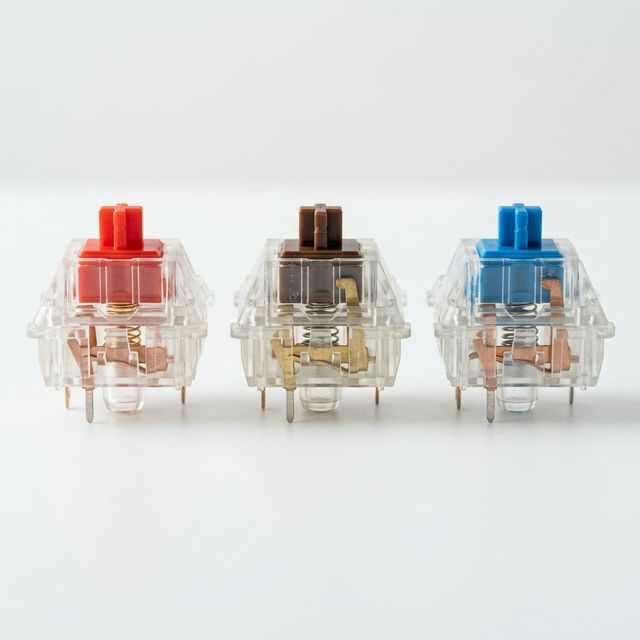
Red vs Brown vs Blue Switches
Buying your first mechanical keyboard is an exciting moment until you hit the checkout page and see a terrifying dropdown menu:
“Select Switch Type: Red, Brown, or Blue.”
If you don’t know the difference, choosing the wrong switch can completely ruin your typing experience. You might end up with a keyboard that wakes up your roommates or one that feels too “mushy” for your liking.
Mechanical keyboard switches are categorized into three main families based on how they feel and sound: Linear (Red), Tactile (Brown), and Clicky (Blue).
Let’s break down exactly what each one means so you can buy with confidence.
1. Linear Switches (Usually RED)
The Vibe: Smooth, fast, and silent.
Linear switches are the simplest mechanism. When you press the key down, it moves straight from the top to the bottom without any resistance in the middle. There is no physical “bump” to let you know the key has been registered—it just goes smoothly up and down.
The Sound: They are inherently the quietest switches. The only noise comes from the plastic of the keycap hitting the bottom of the keyboard (and the sound of it springing back up). If you love that deep, muted “Thocky” sound we talked about in our Day 8 Creamy Keyboard Guide, linear switches are almost always used.
Who should buy them?
- Gamers: Because there is no resistance, you can rapidly press keys in quick succession (spamming skills in games).
- Office Workers: They are quiet enough not to annoy your coworkers.
- Fast Typists: Once you get used to them, your fingers glide over the keys like water.
2. Tactile Switches (Usually BROWN or PURPLE)
The Vibe: The “Goldilocks” switch. A satisfying bump.
Tactile switches are a middle ground. When you press a tactile switch, about halfway down the keystroke, you feel a small, physical “bump” inside the mechanism. This bump provides physical feedback that your press has been registered.
The Sound: They have a moderate sound level. You don’t get a loud artificial click, but the internal bump mechanism creates a slightly louder, deeper sound than a linear switch.
Who should buy them?
- First-Time Buyers: If you are coming from a standard membrane keyboard or a MacBook, Tactile is the safest choice to experience the “mechanical” feel.
- Writers and Programmers: The physical “bump” provides confidence. You know exactly when the key registers, reducing typing errors.
- Hybrid Users: Perfect for people who split their time 50/50 between typing emails and playing video games.
3. Clicky Switches (Usually BLUE or GREEN)
The Vibe: Auditory satisfaction, but a potential nuisance.
Clicky switches have the same physical “bump” as tactile switches, but they add a deliberate mechanical mechanism (like a click jacket or click bar) that snaps violently to produce a loud, sharp “CLICK!” sound every time you press a key.
The Sound: Extremely loud, high-pitched, and intentionally noisy. It sounds like an old-fashioned typewriter.
Who should buy them?
- People who type alone in a room: If you love the auditory feedback of knowing every keystroke is hitting home.
- Rage Typists: If you want your keyboard to sound as aggressive as you feel.
- Who should NOT buy them: Anyone who shares an office, goes on Zoom calls, or lives with people. (Seriously, a Clicky keyboard creates real arguments between roommates).
Summary: How to Choose
If you still aren’t sure, follow this cheat sheet:
- Buy Linear (Red) if you want speed and low noise.
- Buy Tactile (Brown) if you want typing accuracy and the best all-around feel.
- Buy Clicky (Blue) if you want to feel like a hacker in an 80s movie and live alone in a soundproof bunker.
Note: Many high-end keyboards have moved past the basic “Red/Brown/Blue” naming conventions (like NuPhy’s “Cowberry” or “Wisteria” switches). However, they will ALWAYS state whether they are Linear, Tactile, or Clicky in the product description!