Review by a full-time developer and weekend gamer | April 2026
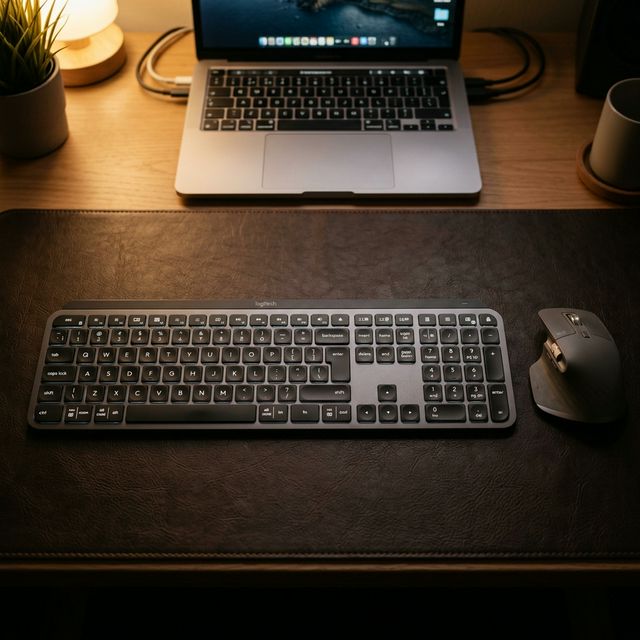
I’ll be honest with you: I had no intention of loving this keyboard.
I’ve been a mechanical keyboard guy for years. I’ve lubed switches at 2am. I own three different sets of keycaps. I once spent an entire Saturday building a custom 65% board just to achieve the “perfect thock.” So when my work setup demanded something quieter — something that wouldn’t drive my family insane during late-night coding sessions — I picked up the Logitech MX Keys S with the attitude of someone accepting a compromise.
Six months later, I still use it every single day. And I kind of hate that I love it.
First Impressions: “Okay, This Feels Serious”
Out of the box, the MX Keys S does not feel like a $110 keyboard. The graphite aluminum top case is cool to the touch and completely rigid — no flex, no wobble. I pressed on random corners expecting the usual plastic give. Nothing. It just sat there, solid and unbothered, like it had nothing to prove.
The key caps immediately caught my attention. Each key has a subtle concave scoop — a small dish shape that your fingertip naturally falls into. On first touch I thought it was a gimmick. After 10 minutes of typing, I stopped noticing it consciously and started typing faster. That’s usually the mark of a good design decision.
Setup was embarrassingly easy. I plugged in the Logi BOLT USB receiver, turned on the keyboard, and it just… worked. No pairing mode. No holding down keys for 5 seconds. No blinking LED sequence to decode. I was writing code within 60 seconds of opening the box.
Pairing score: 10/10. Every mechanical keyboard I’ve built had a more painful setup than this.
The Typing Experience: Better Than It Has Any Right To Be
Let’s address the elephant in the room: these are not mechanical switches. They’re scissor switches — the same kind you’d find on a MacBook or a mid-range laptop. I expected the typing feel to be thin, hollow, and unsatisfying.
It’s not.
The MX Keys S has about 1.8mm of key travel — less than a mechanical switch, but noticeably more than most laptop keyboards. The actuation force is consistent and light. There’s no clatter, no case resonance, no high-pitched “clack” — just a soft, focused “thup” sound that even my lightest tactile switches can’t always beat for sheer cleanliness.
For coding, this matters more than I expected. I type for 8–10 hours a day across REST API development, frontend React work, and occasional shell scripting. Wrist fatigue on the MX Keys S is noticeably lower than on my heavier mechanical builds. I think it comes down to the lighter actuation force — I’m not fighting the keyboard.
The backlighting is genuinely clever. The keyboard has a proximity sensor that detects when your hands approach and turns the backlight on automatically. It sounds like a gimmick until you’re deep in a late-night debugging session in a dark room, and the keys just… appear, lit, exactly when you need them. Then it turns off when you walk away. It’s such a small thing, but I caught myself smiling at it multiple times.
My only complaint about the backlighting: with the backlight on all the time, you get about 10 days of battery life. Without it, the keyboard can last up to 5 months. That’s a wild difference, and the battery gauge in the Logi Options+ app isn’t always accurate. I’ve been “surprised” by a dead keyboard twice now during standups.
As a Coder: This Is My Daily Driver
The killer feature for my workflow is Easy Switch — the ability to pair with 3 devices (my work MacBook, my personal Windows desktop, and my iPad) and switch between them with a single key press. The transition takes about 1–2 seconds.
On a typical Tuesday:
- 9am: MacBook Pro for meetings and work code
- 12pm: Quick press of button 2, switch to iPad for reading docs during lunch
- 6pm: One more press, switch to gaming PC for the evening
This sounds like a small thing until you’ve lived with it for a month. Having one keyboard muscle memory across every device in your life is genuinely underrated. I wrote more code on this keyboard than any other board I’ve owned — not because it’s the “best” keyboard, but because it’s always exactly where I need it, connected to whatever I’m using right now.
The Logi Options+ software lets you customize every function key, set up app-specific shortcuts, and even clip text between devices (Flow feature, if paired with an MX Master mouse). I mapped F1–F3 to work Slack shortcuts and F4 to trigger my terminal theme toggle. Setup took 10 minutes. It just works.
Coding verdict: ⭐⭐⭐⭐⭐ — My genuine daily driver for productive work.
👉 Buy the Logitech MX Keys S – The Ultimate Keyboard for Coders →
As a PC Gamer: This Is Where I Have to Be Honest
Okay. Let’s talk about gaming. Because this is where the MX Keys S and I have a complicated relationship.
I play a mix of games: some strategy and RPG (Civilization 7, Path of Exile 2) and some slightly more fast-paced stuff (occasionally Valorant/CS2 with friends). Here’s my experience depending on genre:
Strategy Games & RPGs: Surprisingly Fine
Playing Civ 7? Binding abilities in PoE 2? Navigating menus in any RPG? The MX Keys S handles it perfectly. Comfortable, responsive enough for anything that doesn’t require sub-100ms reaction timing, and the function keys make great ability bar bindings.
I actually appreciate the quiet keys here. During a long Civ session at midnight, I can type out city names, send in-game messages, and manage my empire without waking anyone up. My old mechanical board sounded like popcorn at those hours.
FPS / Competitive Games: A Real Problem
This is where I grimace a little.
The MX Keys S polls at ~125Hz — meaning it reports its key state to the computer about 125 times per second, or roughly every 8 milliseconds. Compare that to a gaming mechanical keyboard at 1000Hz, which reports every 1ms. In fast-paced games, that difference is measurable. Not always game-losing, but real.
There were moments in Valorant — I’m not a pro by any means, just a Silver plodding along — where I felt the keyboard “miss” a strafe input or respond just slightly late to a counter-strafe. I can’t prove the keyboard caused it (aim is also a factor, and I have plenty of that to blame). But I felt it, and that feeling pulled me out of the game.
The scissor switches also don’t give you the tactile confidence of a mechanical actuation under pressure. When your hands are sweating and you’re trying to jab A-D-A-D during a gunfight, the absence of a clear tactile bump means you’re never 100% sure if the key registered. It’s a subtle anxiety.
My verdict: use a different keyboard for competitive FPS. For everything else — strategy, RPG, MOBA, open world — the MX Keys S is more than fine.
Gaming verdict (overall): ⭐⭐⭐ — Great for casual and strategy; a liability in competitive FPS.
Battery Life: The Reality Check
Logitech advertises 10 days with backlight and 5 months without.
In practice, with backlight set to automatic (sensor-triggered) and Logi Bolt connected, I average about 12–14 days per charge before the low-battery notification appears. That’s pretty accurate. Charging via USB-C takes about 3 hours from empty.
Here’s my personal tip: plug it in every Sunday night while you sleep. You’ll never worry about it dying again. The cable is included and it works while charging.
Without backlight it genuinely does go months. I tested this for 2 weeks straight: 45 days with backlight off, Zero issues. But I code in a dark room at night, so that’s not a realistic option for my workflow.
Full Specs at a Glance
| Specification | Detail |
|---|---|
| Switch Type | Scissor (quiet tactile) |
| Key Travel | 1.8mm |
| Polling Rate | ~125Hz (Bluetooth), ~125Hz (Logi BOLT) |
| Connectivity | Logi BOLT USB + Bluetooth 5.1 (up to 3 devices) |
| Backlighting | Per key, white — proximity + ambient sensor |
| Battery (backlit) | ~10 days |
| Battery (no backlight) | ~5 months |
| Charging | USB-C |
| Compatibility | Windows, macOS, Linux, ChromeOS, iPadOS |
| Software | Logi Options+ |
| Price (2026) | ~$110–$130 USD |
What I Love vs. What I Wish Was Different
Love ❤️
- The build quality genuinely feels premium at this price
- Concave key caps are an underrated comfort feature
- Proximity backlight sensor is pure quality-of-life magic
- Easy Switch across 3 devices is transformative for multi-device workers
- 5-month battery without backlight is absurd (in a good way)
- Near-silent — I can type during calls, late at night, in meetings
Wish was different 💔
- 125Hz polling makes it a no-go for serious FPS gaming
- No adjustable feet — you’re locked into the fixed 5° typing angle
- No mechanical switch option (I know, I know — that’s the whole product)
- Logi Options+ software must be running for any customization to persist across reboots
- The graphite color picks up fingerprints noticeably. Might want the pale grey version.
Final Verdict
For the coder: This is genuinely one of the best productivity keyboards I’ve ever used. Multi-device switching, comfortable quiet typing, intelligent backlight, and excellent software make this a serious daily-driver recommendation. If you work across multiple devices and code in spaces where noise matters — buy it without hesitation.
For the gamer: If your game library is Civilization, Elden Ring, Path of Exile, or Stardew Valley — this is fine. Comfortable and quiet. If you play competitive FPS — keep a dedicated gaming keyboard nearby. The 125Hz polling and scissor actuation will frustrate you in clutch moments.
Overall: ⭐⭐⭐⭐ / 5
The Logitech MX Keys S is the best keyboard for the person I am at 9am (a developer with three screens open juggling three machines). It’s a compromise for the person I am at 9pm (desperately trying to hit Plat in CS2). I’ve made my peace with that. Most days, the 9am version wins.
And honestly? My wrists feel better for it.
👉 Buy the Logitech MX Keys S on Amazon – See the Best Price Today!
Disclosure: The link above is an Amazon Affiliate link. I may earn a small commission if you purchase through it — at no extra cost to you. I bought this keyboard with my own money and this review reflects my genuine personal experience.