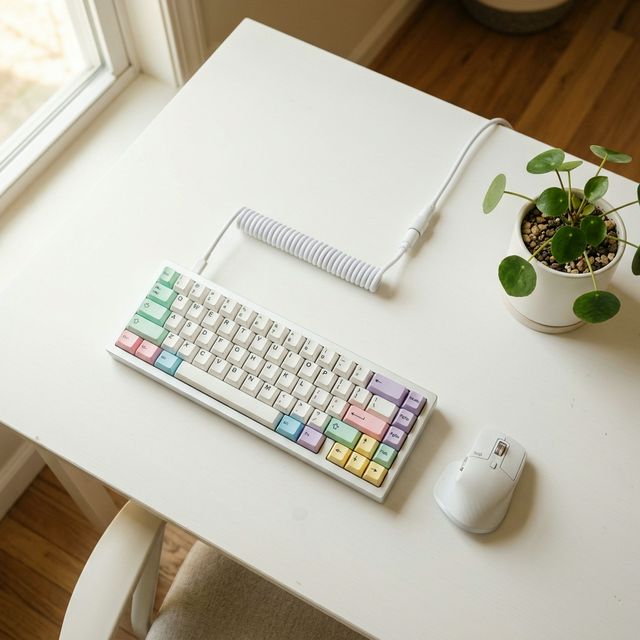
Clean Minimalist 65% Desk
If you’ve been reading our Guide to Keyboard Sizes, you know there is a dizzying number of layouts to choose from. But if you ask any keyboard enthusiast what the “perfect” layout is, most of them will whisper the same answer: 65%.
Why? Because it’s the Goldilocks of keyboard sizes. Unlike a 60% board (which sacrifices arrow keys – a deal breaker for many), the 65% layout keeps your dedicated arrow keys AND a slim column of navigation keys (Delete, Page Up, Page Down). All of this in a package that’s barely bigger than a TV remote.
It’s the keyboard for people who want their desk to look like a Pinterest board, not a NASA control panel.
1. The “Endgame” Board: Keychron Q2 Max
This is the board that keyboard YouTubers call “Endgame” — meaning, once you buy it, you stop looking for anything else. It’s that good.
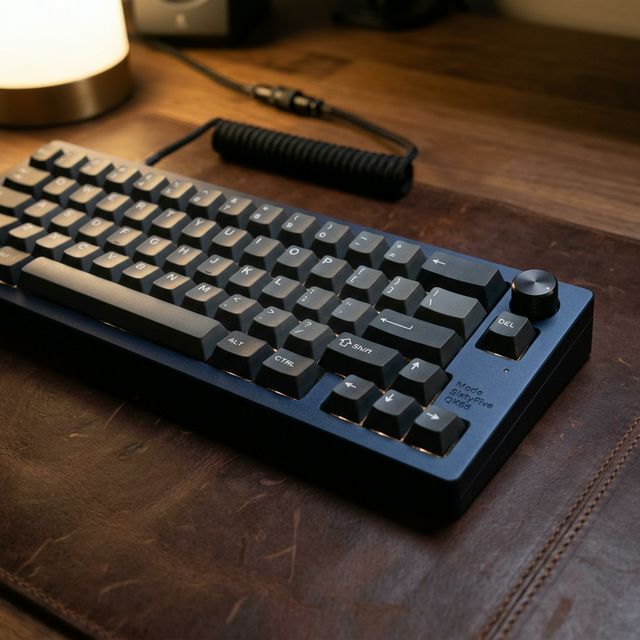
Premium Keychron Q2
Why it dominates:
- Full Aluminum Body: This thing is HEAVY. Pick it up and you’ll think someone hid a brick inside. That weight translates to zero wobble and an incredibly stable typing platform.
- Rotary Knob: The metal volume knob in the top-right corner is not just a gimmick. It’s smooth, clicky, and programmable (you can set it to scroll, zoom, or adjust brightness).
- QMK/VIA: Fully remappable. Every single key can be customized through a browser interface.
- My Personal Take: If keyboards were cars, this is a Mercedes E-Class. It’s heavy, refined, and makes everything else feel cheap. The only “problem” is that once you type on it, your laptop keyboard will feel like a wet sponge.
Pros: Premium build, gasket mount, wireless + wired, QMK/VIA. Cons: Heavy (not travel-friendly), higher price point (~$180-200).
👉 Check Latest Price on Amazon
2. The Budget Champion: Royal Kludge RK68
If you want to experience the 65% life without risking your rent money, the RK68 is your gateway drug.
Why it dominates:
- Hot-Swappable: Hate the switches it came with? Pull them out with your fingers (well, a switch puller) and pop in new ones. No soldering required.
- Triple-Mode Connectivity: Bluetooth, 2.4GHz dongle, AND USB-C wired. At this price, that’s borderline illegal.
- My Personal Take: Is it as premium as the Keychron Q2? Absolutely not. The plastic case flexes if you squeeze it. But guess what? When you’re typing, you can’t tell the difference. The switches click, the keys register, and the RGB shines. For under $50, it’s a steal.
Pros: Incredibly affordable, hot-swap, tri-mode, South-facing LEDs. Cons: Plastic build, stock stabilizers need some love (check our Stabilizer Tuning Guide for a quick fix).
👉 Check Latest Price on Amazon
3. The Silent Assassin: Leopold FC660M
Leopold is the brand that keyboard purists worship in silence (pun intended). The FC660M doesn’t have RGB, doesn’t have wireless, doesn’t have a fancy knob. What it does have is possibly the best stock typing experience money can buy.
Why it dominates:
- Sound Dampening: Leopold fills the inside of the case with sound-absorbing material from the factory. Out of the box, it sounds deeper and more refined than keyboards twice its price.
- Cherry MX Switches: No clones, no knockoffs. Genuine Cherry MX switches with a proven 100-million keystroke lifespan.
- My Personal Take: I call this the “Introvert’s Keyboard.” It doesn’t scream for attention. It sits on your desk quietly, performs flawlessly, and never breaks. If you want zero drama and pure function, this is it.
Pros: Legendary build quality, premium PBT keycaps, best stock sound. Cons: No wireless, no hot-swap, no RGB (some people consider this a “pro”).
👉 Check Latest Price on Amazon
4. The Aesthetic King: MELETRIX ZOOM65 V3
If you care about how your desk looks on Instagram, the ZOOM65 is the keyboard equivalent of a Wes Anderson movie. It comes in colors like “E-White,” “Blush Pink,” and “Scarlet Red.”
Why it dominates:
- Design Language: A unique “blocky” design with a matching color-coordinated bottom weight. The typing angle is aggressive (8 degrees) which some people love for fast bursts.
- Bluetooth Module: The wireless module is removable, so you can choose between wired-only (lighter) or wireless (convenient).
- My Personal Take: This is a “show-off” board in the best way possible. When my friends visit, the first thing they say isn’t “nice monitor” — it’s “WHAT is that keyboard?!” Mission accomplished.
Pros: Stunning colorways, gasket mount, unique design, removable wireless module. Cons: Limited availability (sells out fast), not the quietest out of the box.
5. The “Swiss Army Knife”: EPOMAKER TH66
A 65% board with a built-in display? Yes, that exists. EPOMAKER keeps pushing boundaries.
Why it dominates:
- LCD Screen: A tiny screen on the top-right shows GIFs, clocks, CPU temps, or custom images. Is it necessary? No. Is it incredibly cool? Yes.
- South-Facing LEDs: This means your RGB shines through the keycap legends properly, and you can use all aftermarket Cherry-profile keycaps without interference.
- My Personal Take: If you like gadgets and conversation starters, this is your board. I set the tiny screen to display a pixel art cat. Zero productivity gained, but maximum happiness achieved.
Pros: Unique LCD screen, hot-swap, affordable, South-facing RGB. Cons: Software can be buggy, screen is a battery drain on wireless mode.
👉 Check Latest Price on Amazon
Why 65% is the Perfect Layout
Here’s a quick breakdown of why 65% hits the sweet spot:
| Feature | 60% | 65% | 75% | TKL |
|---|---|---|---|---|
| Arrow Keys | ❌ | ✅ | ✅ | ✅ |
| Delete Key | ❌ | ✅ | ✅ | ✅ |
| Function Row | ❌ | ❌ | ✅ | ✅ |
| Desk Space Saved | ⭐⭐⭐ | ⭐⭐⭐ | ⭐⭐ | ⭐ |
| Best For | Gamers | Everyone | Coders | Traditional |
The 65% layout gives you everything you actually need and nothing you don’t. You lose the F-row (which you access via Fn shortcuts anyway) and gain a clean, photogenic desk.
Final Verdict
- Best Overall: Keychron Q2 Max (if budget allows)
- Best Budget: Royal Kludge RK68 (unbeatable value)
- Best for Purists: Leopold FC660M (zero nonsense)
Affiliate Disclosure: This post contains affiliate links. As an Amazon Associate, I earn from qualifying purchases. If you click a link and buy something, I may receive a small commission at no extra cost to you. This helps keep the blog running. Thank you for your support!