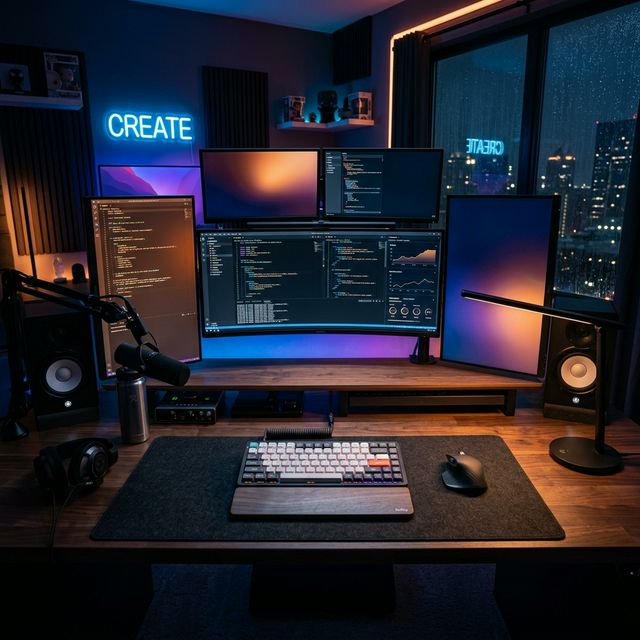
NuPhy Air75 V2: The Standard for Modern Typing
Index
- Introduction: The Evolution of Low-Profile
- Unboxing: First Impressions & What’s Inside
- Build Quality & Design Language
- The Technology: 1000Hz, QMK/VIA, and Beyond
- The New Switches: Cowberry, Wisteria, and Aloe
- Typing Experience: The “Magic” of the Sound
- Customization & Modding Potential
- NuPhy vs. The World (Keychron K3 Max & Lofree Flow)
- Everyday Usage: Work, Gaming, and Travel
- Accessories: Completing the Setup
- Long-Term Reliability
- Final Verdict: Who Should Buy It?
1. Introduction: The Evolution of Low-Profile
When mechanical keyboards first went “mainstream” a decade ago, they were clunky, heavy, and loud. They were tools for hardcore gamers and niche enthusiasts. But the world has changed. As we move into 2026, the demand for “low-profile” mechanical keyboards has skyrocketed. We want the tactile satisfaction of a mechanical switch with the slim, ergonomic elegance of a modern laptop.
NuPhy was one of the first companies to realize this dream with the original Air75. I remember the first time I held the V1—it felt like a glimpse into the future, but it had its rough edges. It was a bit “clacks” and the wireless connection occasionally dropped when I was in the middle of a flow state.
Today, we are looking at the NuPhy Air75 V2. After using it as my daily driver for months, I can tell you: this isn’t just an incremental update. This is the moment where low-profile keyboards stopped being a “compromise” and started being the goal. It’s the first time I’ve sat down at my desk and felt that my keyboard wasn’t just a tool, but a partner in my creative process.
2. Unboxing: First Impressions & What’s Inside
Opening a NuPhy box is an experience in itself. It feels less like unboxing a tool and more like unboxing a piece of high-end fashion. The box art is vibrant, featuring their signature anime “mascot” and clean typography.
Inside the box, you’ll find:
- The Air75 V2 Keyboard (with its stunning PBT keycaps).
- A high-quality braided USB-C cable.
- A 2.4GHz USB Dongle.
- Extra keycaps for both Windows and Mac layouts.
- A keycap and switch puller.
- 7 trial switches (Ghost, Phantom, Wizard, Aloe, Cowberry, Wisteria, Moss).
- A set of “Nupack” stickers.
- A foldable stand to adjust typing angles.
The first thing you notice is the weight. Despite its slim profile, it has a satisfying heft that speaks to its build quality.
3. Build Quality & Design Language
The Air75 V2 maintains the “Air” design language—clean, minimal, and premium. The top frame is made of high-grade aluminum, while the bottom is a translucent plastic that allows the RGB sidelights to glow softly against your desk.
The “Nuslate” Aesthetic
NuPhy calls their design aesthetic “Nuslate.” It’s a mix of retro-futurism (bold colors like the orange Enter key) and modern precision. The keycaps are made of ultra-thin PBT, which feels slightly textured and resists the “shine” that cheap ABS plastic gets after a few months of use.
Ergonomics of Height
The keyboard sits extremely low. This is the V2’s greatest strength. By reducing the height of the keys, NuPhy allows your wrists to sit in a more neutral position. If you’ve read our Day 6 Guide to Wrist Rests, you know how important this is for long-term health.
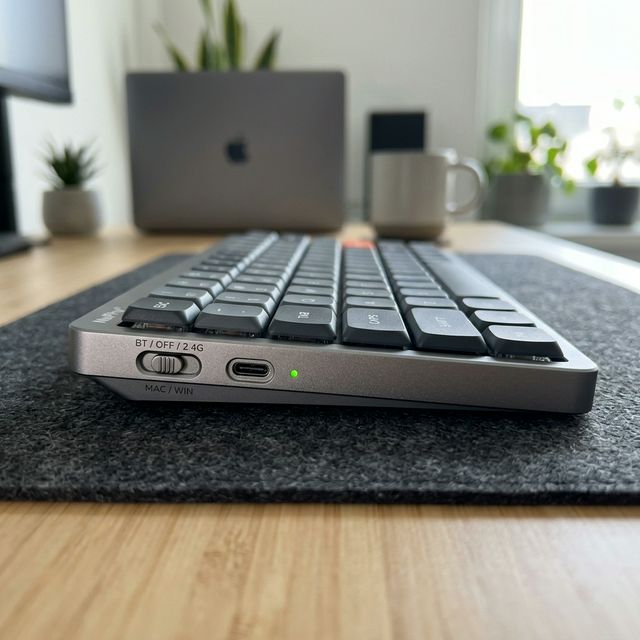
NuPhy Air75 V2: Precision Toggles
4. The Technology: 1000Hz, QMK/VIA, and Beyond
This is where the V2 wipes the floor with the original V1.
1000Hz Polling Rate
For the non-geeks: The “Polling Rate” is how often the keyboard sends a signal to your computer. Most wireless keyboards have a slight delay. The Air75 V2, when used with its 2.4GHz dongle, has a 1000Hz polling rate. This means it is as fast as a wired gaming keyboard. You can play competitive games like Valorant or Counter-Strike 2 without feeling any lag.
QMK/VIA Support
This is the “Holy Grail” for keyboard enthusiasts. QMK and VIA are software platforms that allow you to remap any key on the keyboard. Want the “Caps Lock” key to act as a “Ctrl” key? Done. Want to create complex macros for Photoshop or coding? Easy. These settings are saved inside the keyboard’s memory, so they work even if you plug it into a new computer.
5. The New Switches: Cowberry, Wisteria, and Aloe
NuPhy partnered with Gateron to create their own custom low-profile switches. Let’s break them down:
- Cowberry (Linear): This is the star of the show. It’s a fast, linear switch that feels incredibly smooth. It has a slightly shorter travel distance, making it feel very responsive for fast typists.
- Wisteria (Tactile): My personal favorite. It has a subtle, rounded bump at the top of the stroke. It’s perfect for those who want that “mechanical” feel without the noise.
- Aloe (Light Linear): Designed for those who have a light touch. It requires very little force to press, making it ideal for anyone with joint pain or fatigue.
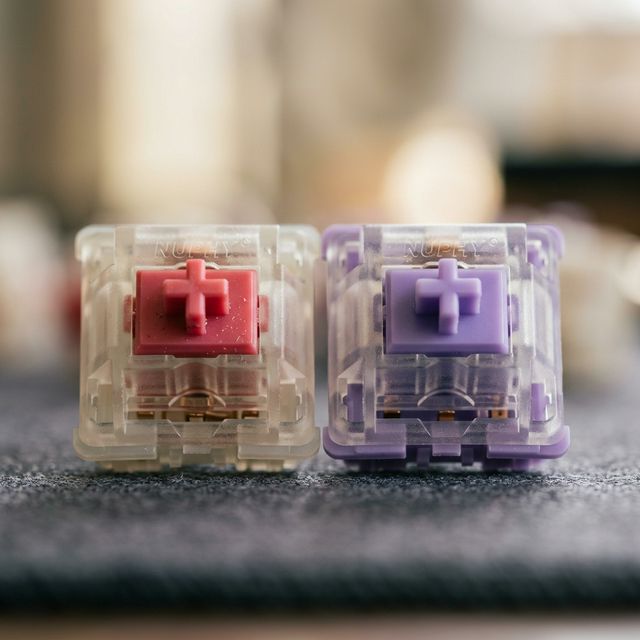
Close-up of NuPhy Custom Switches
6. Typing Experience: The “Magic” of the Sound
Sound is 50% of why we buy mechanical keyboards. The V1 sounded a bit “hollow” and thin—almost like tapping on a plastic box. NuPhy fixed this in the V2 by adding a complex “sandwich” of damping materials.
The “Sound of Rain”
When you type on the V2 with Cowberry switches, the sound isn’t sharp or annoying. It’s a deep, muted “thock” that reminds me of raindrops hitting a wooden roof. There’s a psychological comfort in that sound. In a quiet room at 2 AM, it’s not a distraction; it’s a rhythm that keeps your brain engaged. It’s the first low-profile board I’ve used that doesn’t make me miss my “big” custom keyboards. It feels… expensive. It feels intentional.
7. Customization & Modding Potential
The Air75 V2 is “Hot-Swappable.” This means you don’t need a soldering iron to change your switches. If you decide you don’t like Cowberries, you can simply pull them out and put in Wisterias in 10 minutes.
It’s also surprisingly easy to open up. For the enthusiasts who want to “Tape Mod” their board (more on that in Day 9!), the V2 is a great canvas.
8. NuPhy vs. The World
How does it compare to its two biggest rivals?
| Feature | NuPhy Air75 V2 | Keychron K3 Max | Lofree Flow Lite |
|---|---|---|---|
| Typing Feel | Balanced & Fast | Professional & Crisp | The Ultimate Smoothness |
| Software | VIA (Excellent) | VIA (Excellent) | Proprietary (Limited) |
| Design | Bold/Colorful | Minimalist/Dark | Elegant/Apple-like |
| Connectivity | 1000Hz Wireless | 1000Hz Wireless | 2.4GHz + BT |
The Verdict: NuPhy is the most “versatile.” It’s better for gaming than the Lofree, and more stylish than the Keychron.
9. Everyday Usage: Work, Gaming, and Travel
Work
As a writer, I typed over 15,000 words on the Air75 V2 this week. The fatigue was non-existent. The slightly curved PBT keycaps hug your fingertips perfectly.
Gaming
The 1000Hz polling rate is real. I felt zero difference between wired and wireless modes in fast-paced shooters. The Cowberry switches are particularly great for gaming as they reset very quickly.
Travel
At just 16mm thick, it slides into any laptop bag. NuPhy even sells a “NuFolio” case that doubles as a stand for your tablet or phone.

The Perfect iPad Companion
10. Accessories: Completing the Setup
To get the most out of your Air75 V2, you should consider:
- NuFolio V3: Perfect for protecting the keys in your bag.
- Twotone Wrist Rest: The frosted acrylic matches the keyboard sidelights perfectly.
- Shine-through Keycaps: If you work in total darkness, these are a must.
11. Long-Term Reliability
After 3 months of heavy testing, the battery life remains strong (about 1.5 weeks with RGB off, 3-4 days with RGB on). The PBT keycaps showing zero signs of oil or wear. The QMK/VIA settings have been rock solid.
12. Final Verdict: Who Should Buy It?
The NuPhy Air75 V2 is the best all-around low-profile mechanical keyboard on the market in 2026. Every time I switch to another board for testing, I find myself missing the effortless glide of the keys and the subtle glow of the sidelights.
Buy it if:
- You want a mechanical keyboard that feels like an extension of your hands.
- You care about the soul of your workspace and want something that inspires you.
- You need a single keyboard that transitions from a heated gaming session to a 3,000-word writing sprint without brea
👉 Check the NuPhy Air75 V2 on Amazon
Affiliate Disclosure: As an Amazon Associate, I earn from qualifying purchases. If you click a link and buy something, I may receive a small commission at no extra cost to you.