In the world of mechanical keyboards, the “thock” and “clack” often take center stage. But for professionals who spend 8-10 hours a day at a desk—coders, writers, and digital nomads—there’s a much more important factor: Ergonomics.
Most traditional mechanical keyboards are tall. While they look and feel great, they often force your wrists into an unnatural upward bend, known as wrist extension. This is where low-profile keyboards come in as a game-changer.
In this article, we’ll dive into the science of why “thin is win” when it comes to long-term wrist health and typing productivity.
1. The Science of Wrist Extension
The primary ergonomic flaw of standard mechanical keyboards is their height. A typical “high-profile” keyboard stands about 30mm–40mm tall at the front. To reach the keys, most users rest their palms on the desk and tilt their hands upward.
Scientific Fact: Frequent wrist extension (tilting the hand up) increases pressure on the Carpal Tunnel. Over time, this can lead to Repetitive Strain Injury (RSI) or Carpal Tunnel Syndrome.
Low-profile keyboards, like the ones featured in our Top 5 Low-Profile Keyboards of 2026, significantly reduce this angle. By sitting closer to the desk surface, they allow your wrists to remain in a neutral position (flat or nearly flat), which is the safest posture for long-duration typing.
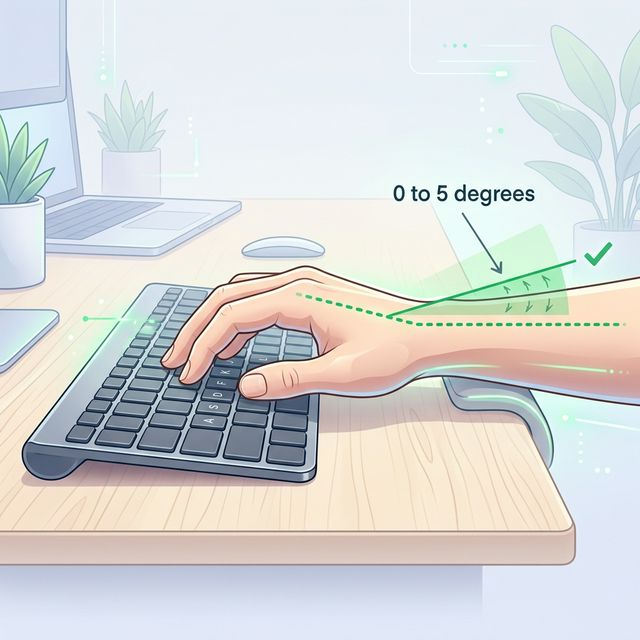
2. No Wrist Rest? No Problem.
Because high-profile keyboards are so tall, you almost need a wrist rest to maintain a safe angle. However, even with a wrist rest, you often apply pressure to the soft tissue of your wrists, which can restrict blood flow.
Low-profile keyboards are designed with a “natural slope.” For example, the NuPhy Air75 V2 has a front height of only 13.5mm. This allows you to type comfortably without an additional accessory, making your setup cleaner and more portable. (See our NuPhy Air75 V2 vs. Logitech MX Mechanical Mini comparison for more on portability).
3. Shorter Key Travel = Less Fatigue?
Traditional mechanical switches usually have a total travel distance of 4.0mm. Low-profile switches, however, typically range between 2.5mm and 3.2mm.
While 1mm might seem insignificant, it adds up over thousands of keystrokes.
- Efficiency: You reach the “actuation point” faster.
- Muscle Strain: Your fingers move less per keystroke, reducing the overall workload on the small muscles in your hands and forearms.
If you are a fast typist (80+ WPM), you will likely notice that your hands feel “fresher” after a long session on a low-profile board compared to a heavy, traditional one.
4. The “Silent” Multiplier
Ergonomics isn’t just about physical posture; it’s also about environmental comfort. Low-profile keyboards, due to their smaller switch housings and lower mass, often produce a more muted sound profile.
If you’re working in a shared office, the reduced “clack” can lower environmental stress for both you and your coworkers. We discussed the best options for this in our guide to Silent Mechanical Keyboards for Open Office Success.
5. Summary: Should You Switch?
| Feature | High-Profile | Low-Profile | Ergonomic Winner |
|---|---|---|---|
| Wrist Angle | Upward Extension | Neutral / Flat | Low-Profile |
| Travel Distance | 3.5mm – 4.0mm | 2.5mm – 3.2mm | Low-Profile |
| Portability | Bulky | Slim & Light | Low-Profile |
| Aesthetics | Classic / Retro | Modern / Sleek | Tie |
Conclusion: If you suffer from wrist fatigue or simply want a more efficient typing experience, a low-profile mechanical keyboard is a scientifically backed investment in your health.