
The Realistic Budget Setup
Let’s be honest: not everyone has a sponsored, $5,000 gaming setup bathed in neon lights. Most of us are playing games on a standard desk in our bedrooms, drinking yesterday’s water, and trying to stretch our budgets as far as possible.
You don’t need to sell a kidney to buy a “flagship” gaming keyboard from those big-name brands that spend more on marketing than on their actual switches. In fact, in 2026, the budget keyboard market is so incredibly competitive that these “cheap” boards are actually outperforming the $200 giants.
Whether you’re a pro-level Valorant sweat, a casual Minecraft architect, or just someone who likes to click-clack while losing in League of Legends, there’s a board here for you. Long gone are the dates of mushy membrane keys for budget gamers.
Let’s look at the 5 best budget gaming keyboards that will make you feel like a pro without making your bank account cry. We’ve tested these in real-world conditions (rage typing included).
1. The “Thocky Assassin”: AULA F75
If you want your teammates to hear the “creamy” goodness of your keystrokes while you’re clutching a 1v4, the AULA F75 is your weapon of choice. We’ve talked about this board before in our guide to creamy switches, but its gaming pedigree is undeniable.
Why it dominates:
- The Gaming Edge: It features a 1000Hz polling rate on its 2.4GHz wireless dongle. In human speak: your keyboard talks to your PC 1,000 times a second. It’s faster than your morning coffee’s caffeine kick, ensuring absolutely zero perceived input lag.
- The Typing Feel: It uses a gasket-mounted design, which means the internal board is suspended on soft silicon pads. This reduces finger fatigue during those grueling 5-hour gaming marathons.
- My Personal Take: This board feels like it should cost $150. It’s heavy, it’s stable, and it sounds like literal ASMR. If you buy this, prepare to have your discord friends ask “Wait, HOW MUCH did that cost?”
Pros: Unbeatable sound out of the box, tri-mode connectivity, excellent stabilizers. Cons: The 75% layout might take a day or two to get used to if you’re coming from a full-sized board.
2. The “Old Reliable”: Keychron C3 Pro
Wait, it has a wire?! Yes, and that’s a undeniably good thing. Cables don’t run out of battery at 1% during the final boss fight.
Why it dominates:
- The Gaming Edge: Wired stability. Zero wireless interference. Zero “Oops, my keyboard died” excuses. It connects via a robust USB-C cable.
- The Typing Feel: Keychron managed to squeeze a “Gasket-like” structure into a sub-$50 board. It uses their in-house Brown or Red switches that are factory-lubed for a smooth stroke right out of the box.
- My Personal Take: The C3 Pro is the Honda Civic of keyboards. It’s not flashy, it doesn’t have a built-in toaster or crazy RGB patterns, but it works every single time you turn on your PC. It’s reliable, sturdy, and honest.
Pros: Extremely affordable, QMK/VIA support (which is crazy at this price), rock-solid wired connection. Cons: No wireless option, ABS keycaps will shine over time compared to PBT.
3. The “Desktop Savior”: Royal Kludge RK61
Look at how much room you have for your mouse! You could basically fit a second desk in the space you save with this 60% board.
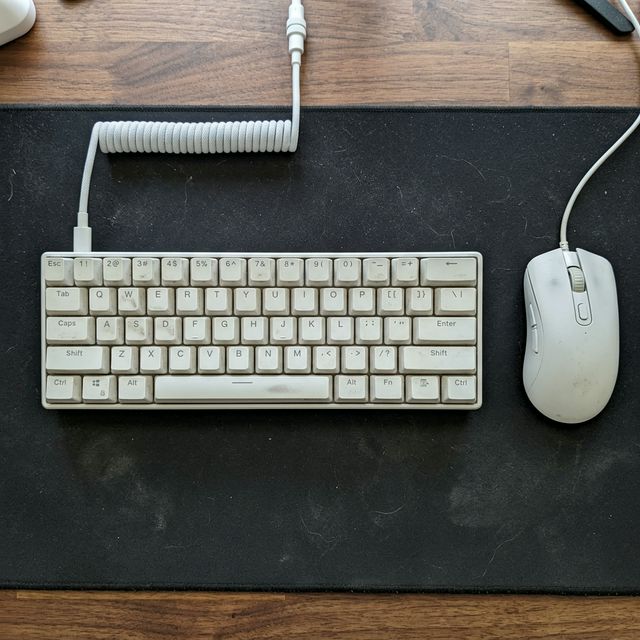
Realistic RK61 Setup
Why it dominates:
- The Gaming Edge: Full focus on mouse movement. If you play low-sensitivity FPS games like CS2 or Valorant, you know the pain of slamming your mouse into the side of your keyboard. The RK61 eliminates this problem entirely.
- The Typing Feel: It’s snappy and responsive. The V3 version features much-improved stabilizers compared to older models, making the spacebar feel solid rather than rattly.
- My Personal Take: It’s tiny, it’s cute, and it’s surprisingly well-built for the price. I’ve used an older RK61 as a travel backup for years. It’s the perfect “I’m going to a LAN party” companion because you can just toss it in a backpack.
Pros: Incredible space-saver, hot-swappable switches, surprisingly bright RGB. Cons: Missing arrow keys and function row (requires using fn shortcuts), which can be annoying for non-gaming tasks.
4. The “Indestructible Tank”: Redragon K552 KUMARA
Redragon doesn’t make keyboards; they make defensive fortifications. This is the board that launched a thousand budget gaming setups.
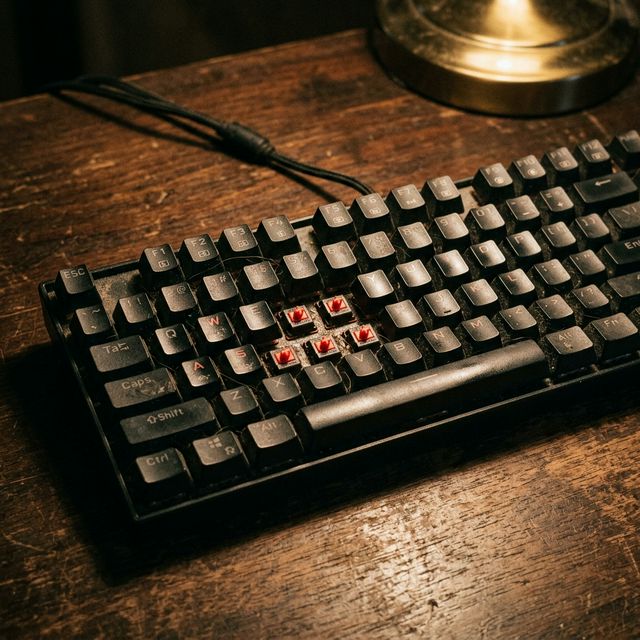
Real World Redragon Wear
Why it dominates:
- The Gaming Edge: Pure, unadulterated durability. With a thick metal top plate and dust-proof mechanical switches, it can survive spills, drops, and the inevitable rage of a lost match.
- The Typing Feel: It’s very “clicky” and tactile (usually shipping with Blue switches). It provides extremely strong physical and auditory feedback. You will never second-guess if you pressed a key or not.
- My Personal Take: It’s loud. It’s heavy. It’s undeniably metallic. It’s definitely not for “quiet typing in a library or shared office,” but it’s the most honest budget board out there. It takes a beating and keeps on clicking.
Pros: Basically indestructible, very strong tactile feedback, incredibly cheap. Cons: Loud (will annoy roommates), the font on the keycaps screams “2012 gamer aesthetic.”
5. The “Enthusiast’s Entryway”: EPOMAKER TH80 Pro
If you want a keyboard that looks, sounds, and feels like it cost $200, the EPOMAKER TH80 Pro is your target.
Why it dominates:
- The Gaming Edge: It features a physical metal media knob (great for adjusting volume during clutch moments without tabbing out) and triple-mode connectivity. The 2.4GHz mode is solid and reliable for fast-paced action.
- The Typing Feel: Equipped with customized Budgerigar (tactile) or Flamingo (linear) switches, it provides a premium, customized feel right out of the box. The sound is deep and muted.
- My Personal Take: This is for the gamer who also cares about desk aesthetics. It has a slightly retro, slightly modern look that fits perfectly in any setup. The knob is a game-changer once you get used to having it.
Pros: Premium switch options, media knob, beautiful keycap designs. Cons: Slightly more expensive than others on this list, software can be clunky to use.
What to Look For in a Budget Gaming Keyboard (2026 Edition)
If you decide to shop outside this list, keep these three rules in mind:
- Polling Rate Matters: Look specifically for 1000Hz on the box or in the specs. This ensures your inputs are registered every 1 millisecond. Anything less might feel sluggish in competitive games.
- Switch Type is Subjective, but… : For pure gaming, Linear (Red/Pink/Black) switches are usually preferred for their rapid, uniform keystroke. Tactile (Brown) is great for a mix of work and play. Avoid Clicky (Blue) unless you live alone and wear noise-canceling headphones.
- Hot-Swappability is King: Look for keyboards labeled “Hot-Swappable.” If a switch breaks (which can happen on budget boards), you want to be able to pull it out with a tiny tool and pop a new $0.50 switch in, rather than throwing the whole keyboard in the trash.
Final Verdict: Which One Should You Buy?
If you want the absolute best overall quality, sound, and typing feel, get the AULA F75. It punches so far above its weight class it’s almost unfair.
If you just want a pure, reliable, distraction-free tool for competitive gaming, the Keychron C3 Pro is untouchable for the $50 price point.